Turn a photo into a line drawing
Upload a photo and make a black-and-white line-art page to review, print, or use as a starting point for a creative project.
Try the on-page converter free. Usage limits may apply.
Try the photo converter


from 243 reviews
Compare the original photo with the line-art result

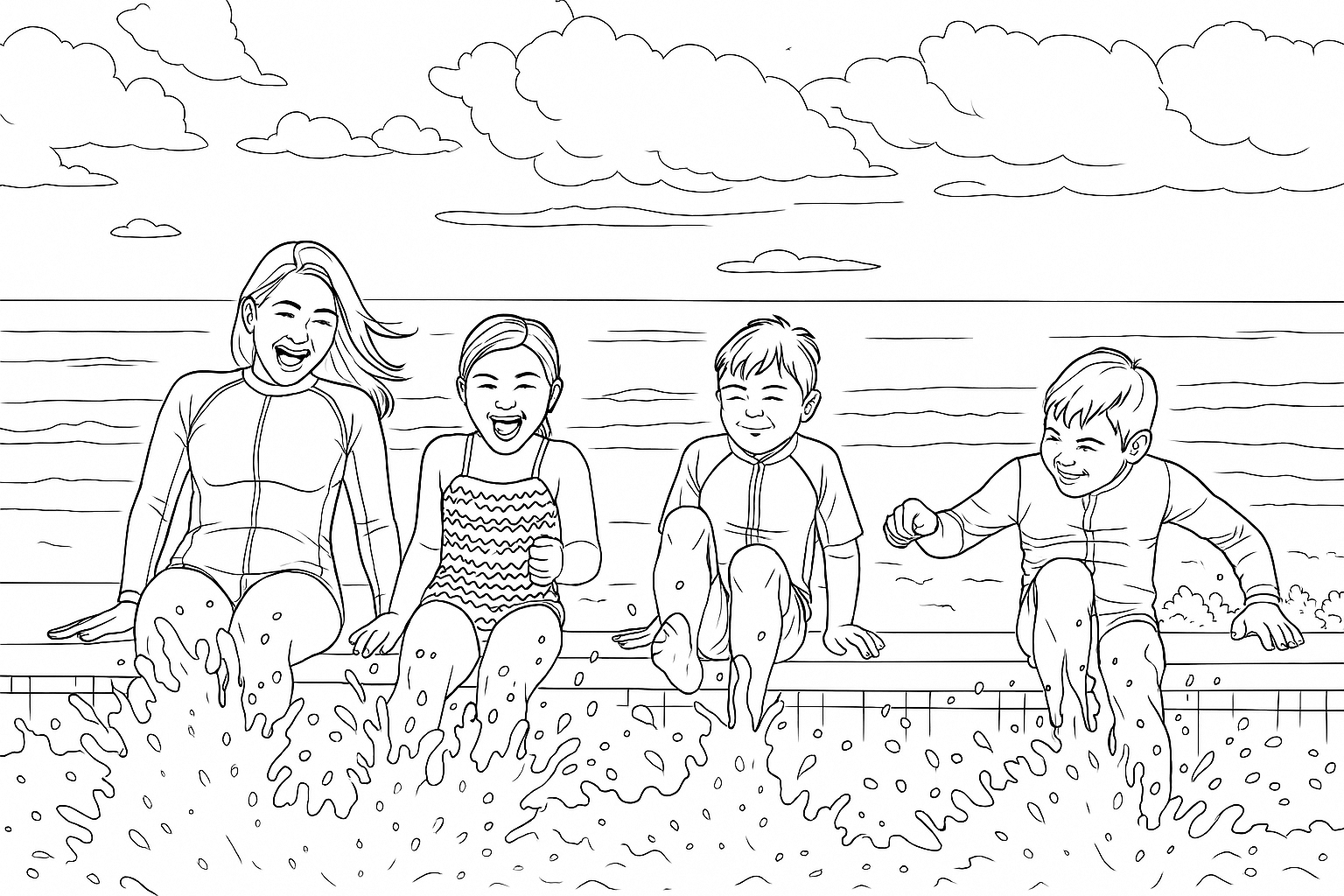
This example shows one possible result. Results vary by photo and style.
Try the photo-to-line-art converter
Upload one JPG, JPEG, PNG, WebP, GIF, or BMP photo. Choose a style, preview your result, and download it as a PNG.
Files can be up to 50 MB. JPG, JPEG, PNG, and WebP files over 1 MiB are compressed in your browser. GIF and BMP files must be 1 MiB or smaller. If you see a limit message, create a free account to continue in the app.
How to turn a photo into line art
Start with a photo you can use, then review the generated image before you print or share it.
Upload one photo
Choose a JPG, JPEG, PNG, WebP, GIF, or BMP file within the size limits shown above.
Choose a style
Select one of the styles available in the converter. A clear photo with a visible subject is a useful place to start.
Preview and download
Check the outlines and framing. Download the on-page result as a PNG when it looks right for your use.
Check the result for your project
Photo conversion can interpret small details differently. Look over the subject, outlines, and edges before using the image.
For a coloring page
Check that the main subject is easy to recognize and that the page has enough open areas to color. Print a test copy if the page is for a child, classroom, or book.
For a craft or design project
The on-page converter gives you a PNG line-art image. Check the result in your own design or craft software and make any changes required by your project.
See plans for more ways to create
The public demo is free to try and may have usage limits. App features, credits, and commercial-use rights depend on your plan.
Pricing
Choose the plan that's right for you
Whether you are printing coloring sheets to keep your kids entertained or running business with high volume needs, we've got a plan for you.
/* Frequency toggle component */Hobby
Higher limits and access to all ways of creating coloring pages
$12.42per month equivalent on annual billing
- Month-to-month: $18/month.
- Annual plan: $149/year, equivalent to $12.42/month (rounded to the nearest cent).
- Annual billing saves $67 compared with 12 monthly payments (about 3.7 month-to-month payments).
- 500 credits/month
- ✓Rollover up to 1 month of credits (500)
- Features
- ✓Create coloring pages from text prompts
- ✓Create coloring pages with words, names, and numbers
- ✓Adjust color, contrast, and brightness
- ✓Turn photos into coloring pages
- ✓Create coloring pages from drawings
- ✓Advanced editing features
- Additional Benefits
- ✓🎁 Bonus: 50 extra credits for experimenting and retries
- ✓Personal use
Artist
Best for those looking to sell their creations
$24.75per month equivalent on annual billing
- Month-to-month: $35/month.
- Annual plan: $297/year, equivalent to $24.75/month (exact).
- Annual billing saves $123 compared with 12 monthly payments (about 3.5 month-to-month payments).
- 1,000 credits/month
- ✓Rollover up to 2 months of credits (2,000)
- Features
- ✓Create coloring pages from text prompts
- ✓Create coloring pages with words, names, and numbers
- ✓Adjust color, contrast, and brightness
- ✓Turn photos into coloring pages
- ✓Create coloring pages from drawings
- ✓Advanced editing features
- ✓Early access to new styles and features
- ✓Bulk Generation
- ✓Commercial use
- Additional Benefits
- ✓🎁 Bonus: 75 extra credits for experimenting and retries
Business
For businesses that need higher limits
$83.08per month equivalent on annual billing
- Month-to-month: $99/month.
- Annual plan: $997/year, equivalent to $83.08/month (rounded to the nearest cent).
- Annual billing saves $191 compared with 12 monthly payments (about 1.9 month-to-month payments).
- 5,000 credits/month
- ✓Rollover up to 3 months of credits (15,000)
- Features
- ✓Create coloring pages from text prompts
- ✓Create coloring pages with words, names, and numbers
- ✓Adjust color, contrast, and brightness
- ✓Turn photos into coloring pages
- ✓Create coloring pages from drawings
- ✓Advanced editing features
- ✓API access after approval
- ✓Early access to new styles and features
- ✓Bulk Generation
- ✓Commercial use
- Additional Benefits
- ✓🎁 Bonus: 250 extra credits for experimenting and retries
Made for creative projects
See what people are saying about creating with ColorBliss
I'm loving what I can do with ColorBliss. Changing photos and drawings to coloring pages. I haven't even started with prompts. It does exactly what it says it does. I'm playing around with some artistic coloring books, and it's wonderful.

Overall brilliant and easy to use. I will be using ColorBliss frequently as I produce more and more coloring books. Easy to learn and produces great results very quickly. Batch processing is a fantastic time saver. Very happy to have find this software

I like the platform as it has really good quality! Easy to navigate, and that saves me a ton of time. I can create new books to publish quick while also keeping high quality material.

ColorBliss is so easy to use, no technical experience is required. It's as simple as typing the text to describe what image you want it to produce. The images generated are absolutely fantastic. Plus, with the plan I am subscribed on to, I can use the images commercially. Overall, a super package. Thankyou.
I'm on coloring page 57. Unbelievable! So easy to make pages using the AI. Every page is unique, beautiful and captivating. Ten minutes of work to create dozens and dozens of coloring pages. Colorbliss works. Fast, simple, and intuitive. Thank you so much for making this!

ColorBliss has a user-friendly interface which is perfect for someone like me who is not tech or AI savvy. I can create coloring pages easily from text prompts, photos, or I can even try to use my own sketches. It provides me a versatile and engaging experience. I would definitely recommend this application to my friends, co-teachers, and even to my students. Thank you for creating this app!
AI coloring page generator FAQ
Everything you need to know about creating coloring pages with AI
Explore related tools
Choose a tool for the kind of page or lettering you want to make.
Try turning a photo into line art
Upload one image, review the result, and download the on-page PNG.
Try the photo converterFree to try. Usage limits may apply.