How to create consistent characters with AI for a coloring book

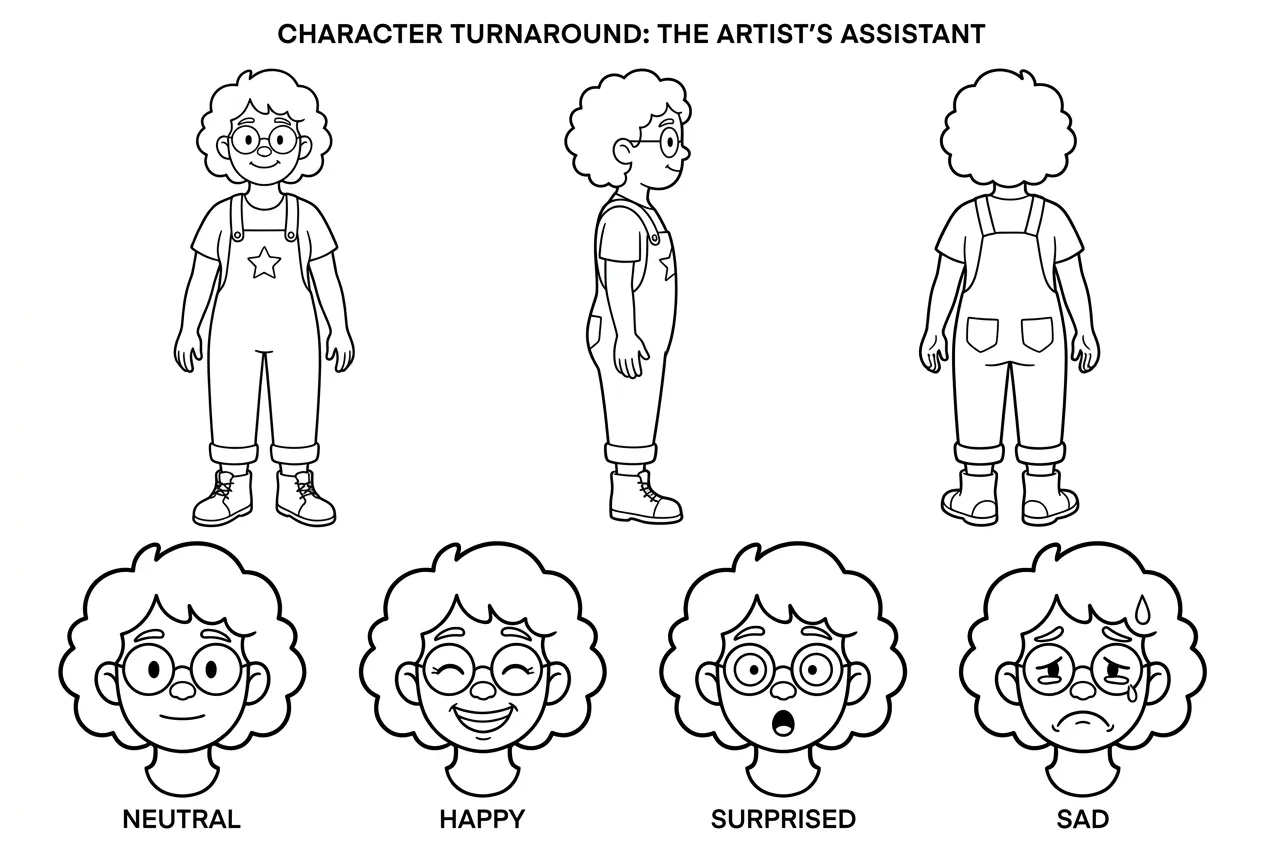
To create consistent characters with AI for a coloring book, use ColorBliss to save one character reference and reuse it in every scene. Keep the same coloring style, then check a few different poses before generating the rest of the book.
Your character can spend the morning in the garden, ride a bicycle to the library, and end the day looking at the stars. The adventure changes with every page. The curls, glasses, and favorite overalls should still belong to the same person.
That’s the challenge we’ll work through with Rowan, our curly-haired explorer. We’ll start with one reference image, take Rowan through ten scenes, and compare the results. By the end, you’ll have a process to try with your own character and a sample book to download.
Key takeaways
- Choose features readers can recognize in black and white, then save a visual reference to reuse across the book.
- Test a few different poses before generating the full set. Check both the character’s appearance and the amount of detail to color.
- Use the ten Rowan pages, consistency scores, and sample PDF below to see what that process produced.
Updated October 16, 2026.
What keeps an AI character consistent across a coloring book?
Consistency starts with features that read clearly in black and white. A red shirt and a blue shirt lose their distinction as outlines. Round glasses, curly hair, and a star on a pair of overalls give readers shapes they can recognize before they pick up a pencil.
A text description names those details, but the AI still has to decide what they look like. A visual reference gives each scene the same appearance to work from. The action, expression, and setting can change while the character stays familiar.
That reference is the starting point. You’ll still need to compare the pages, especially when your character turns sideways, moves, or appears in close-up.
Which AI tool can keep characters consistent across a coloring book?
ColorBliss is a strong choice for this workflow because it combines saved character references with black-and-white coloring-page generation. You save the character once, select it with @, and describe the next scene. The reference also works in bulk generation when you’re ready to make several pages together.
We used that workflow for Rowan’s book. The steps below follow the process from the original image to the finished set, with the pages and our consistency scores alongside the instructions.
How to create your character’s coloring book
1. Settle on your character’s look and save the reference
Start with a clear image that shows the character you want readers to meet throughout the book. A full-body view helps establish the clothing and footwear as well as the face.
For Rowan, we chose an original AI-generated explorer with curly hair, round glasses, ankle boots, and a star on the front of the overalls. Those are the details we’ll look for as the poses change.
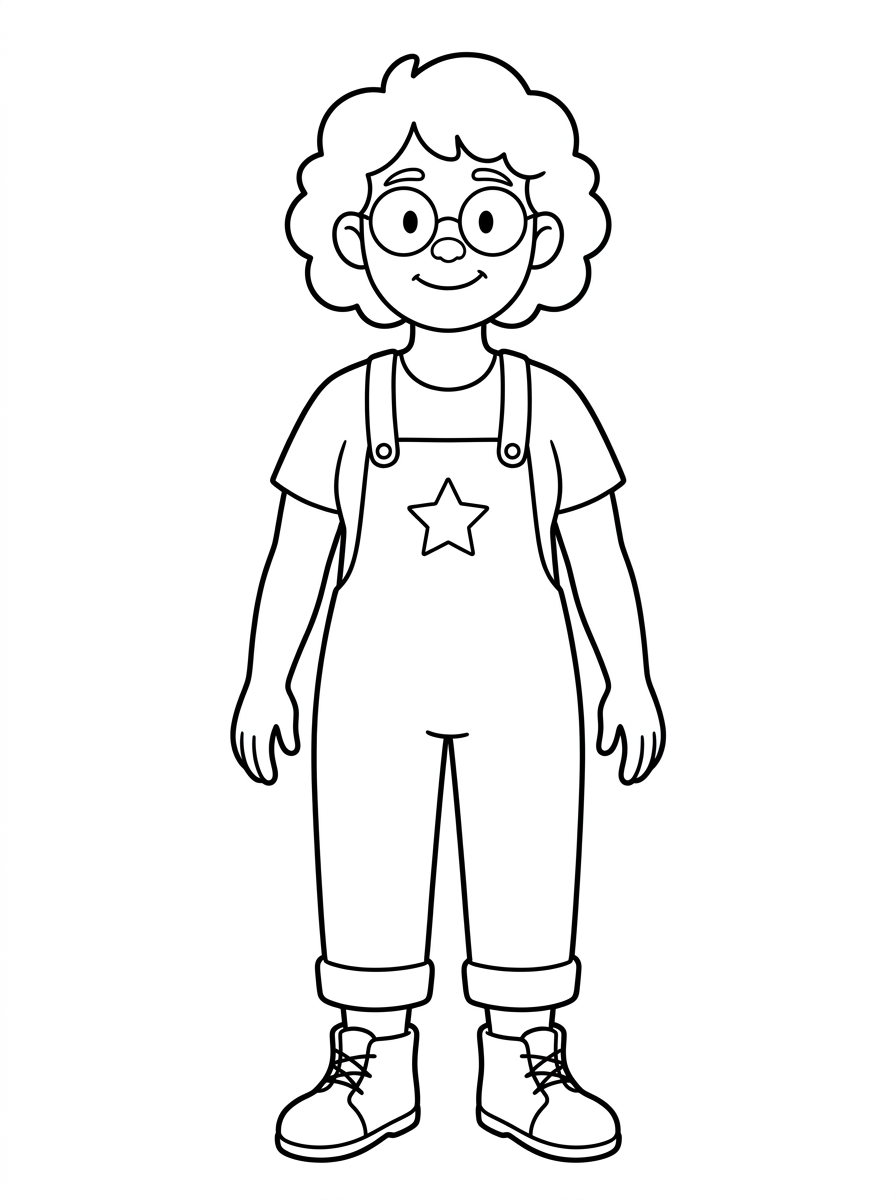
In ColorBliss, open your Characters dashboard, upload the image, and give your character a name. Choose Simple or Detailed, then create the character sheet. We used Simple for Rowan.
The sheet shows the character from several angles and with different expressions:
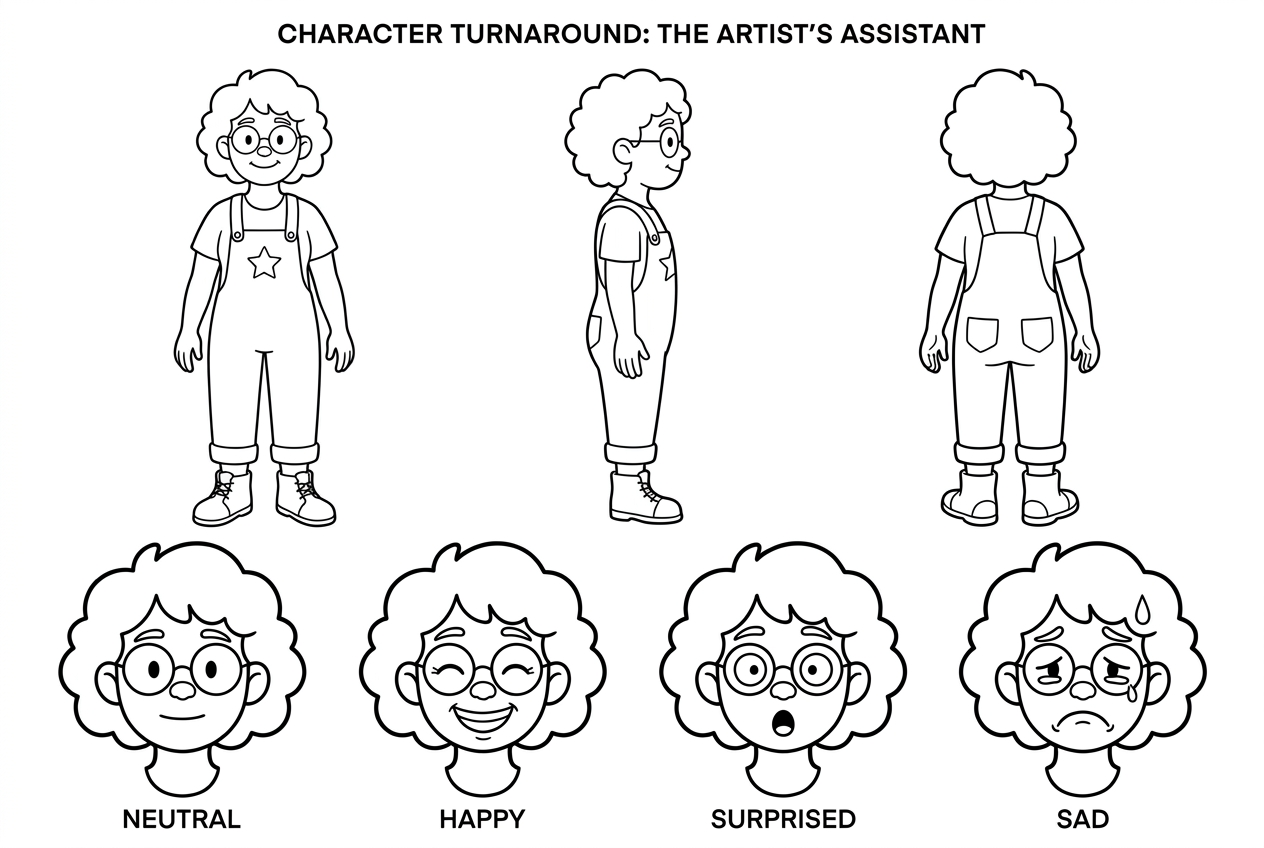
Compare the sheet with your original image. Do the face, hair, clothes, and accessories still look right? Settle on the appearance here before you start putting the character into new scenes.
2. Give your character a new adventure on each page
With your character saved, you’re ready for the first page. In the image generator, type @ and choose the character from the menu. Then describe the action and setting.
For Rowan’s first scene, we started in the garden:
@Rowan stands facing the viewer in a vegetable garden, holding a watering can in the right hand, with raised beds and a small garden gate
We used High character quality for these examples. Choose that setting to follow along, and keep the page orientation and coloring style the same across your scenes.
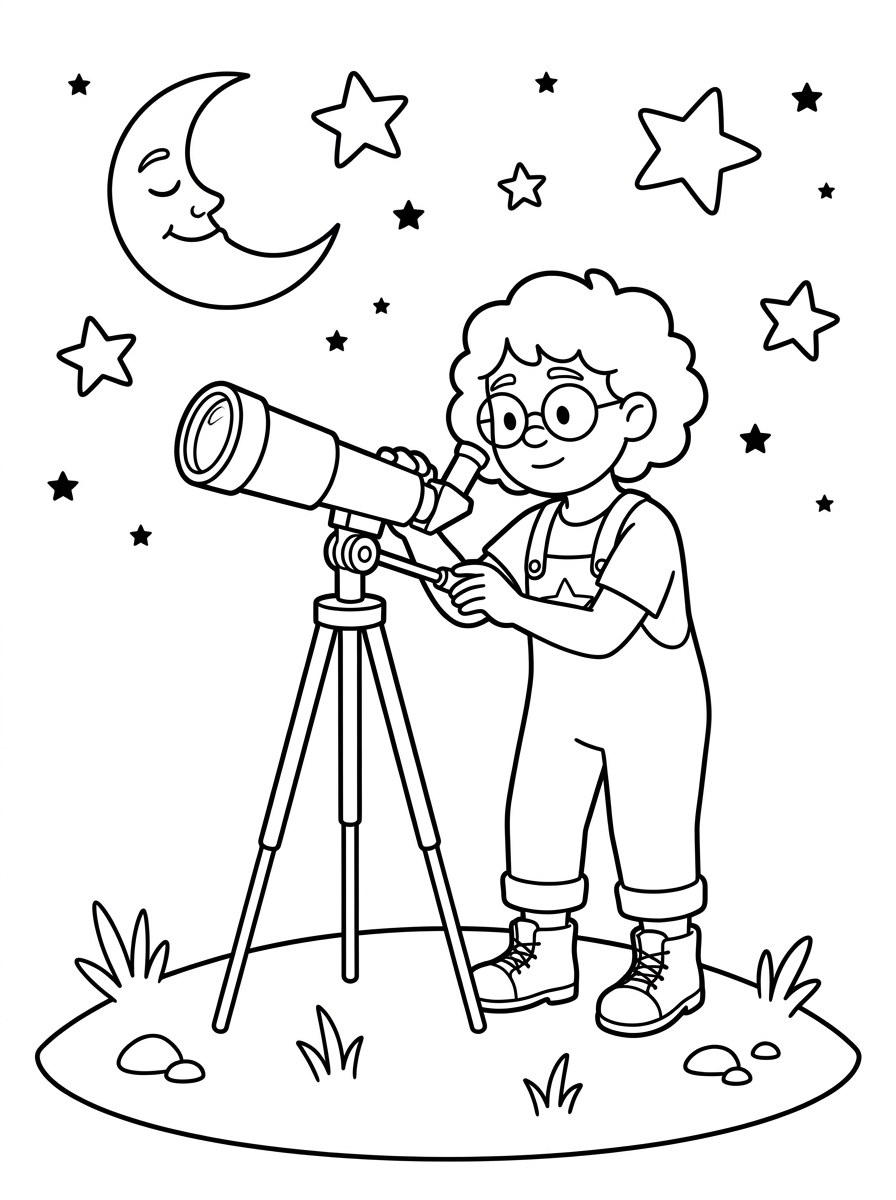
For the next page, keep the same character selected and change the activity. We took Rowan from the garden to a hill for an evening under the stars:
Another scene brought Rowan home to bake cookies:
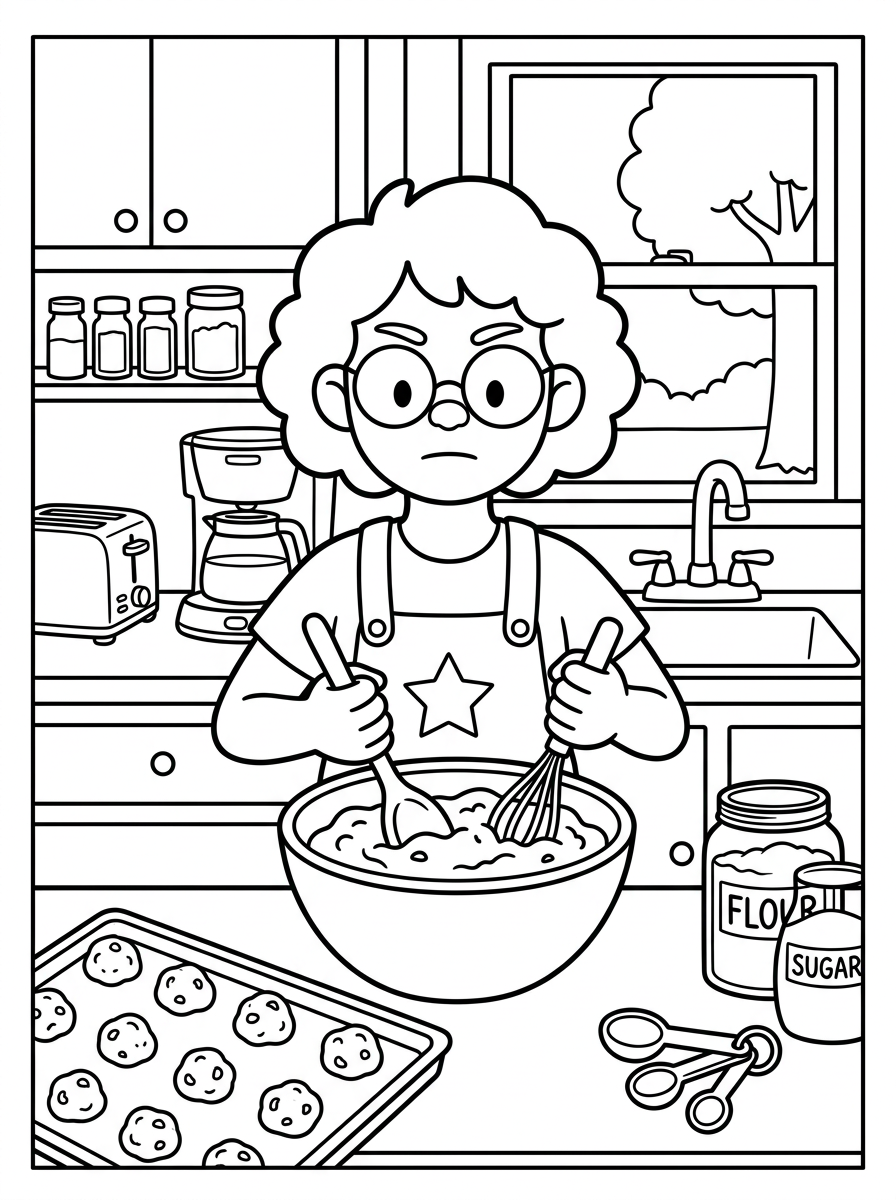
The telescope and mixing bowl give Rowan something new to do. Now look past those props: do the curls, glasses, and overalls still match?
3. Check the character across different poses
To check the match, put your pages side by side with the reference. Try a front view, a side view, a close-up, and an action scene before making the whole book. Look for the features you chose in step one.
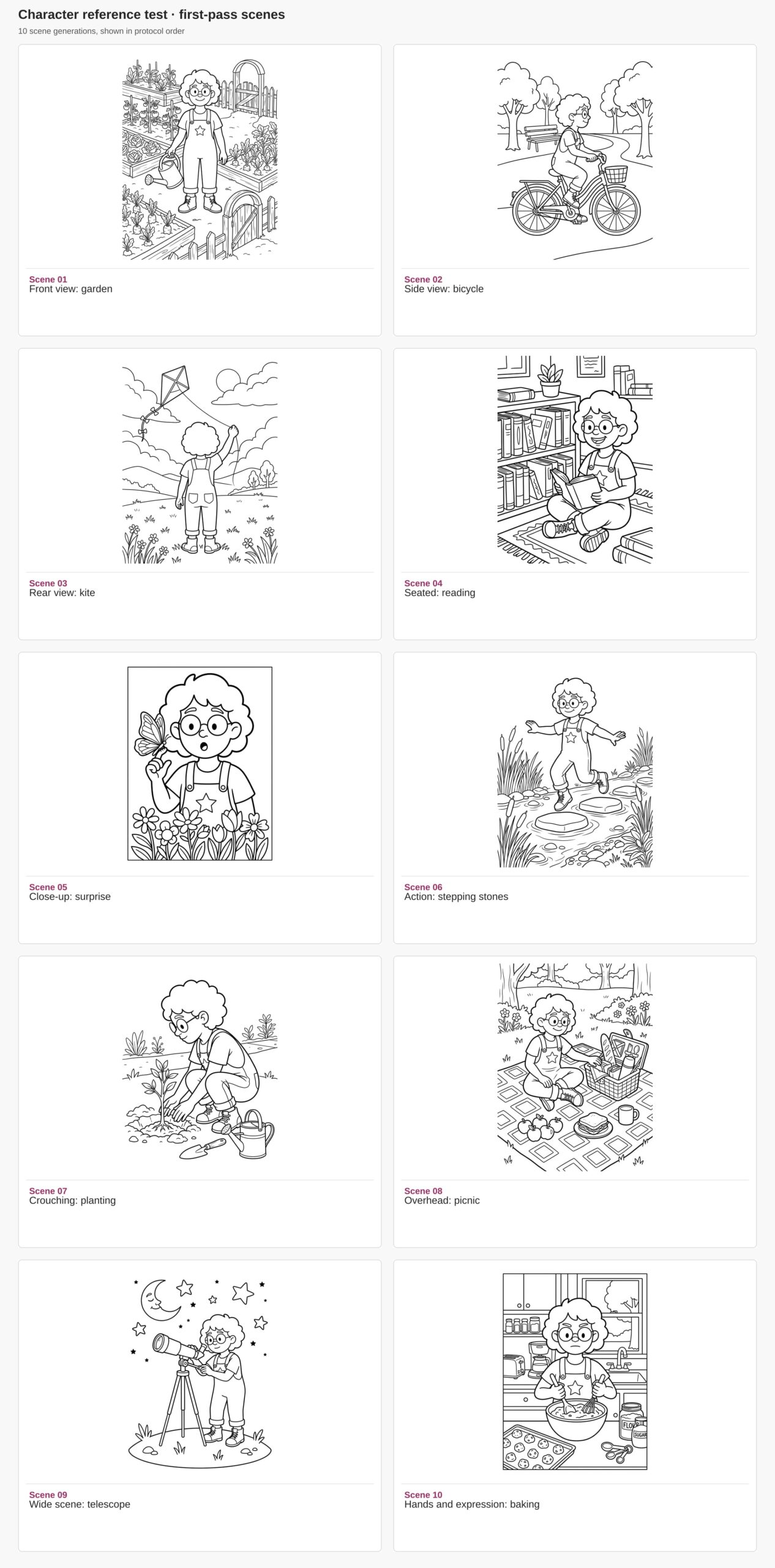
We extended that check to ten scenes for Rowan. The kite page shows the character from behind; the butterfly page brings us close to the face. Here is the complete set:
Rowan’s consistency scores
In our October 16, 2026 assessment, all ten ColorBliss example pages scored 2/2 for character match and 2/2 for outfit match. Rowan stayed recognizable across the changing scenes, including the visible curls, glasses, and overalls.
We used the same scale for each page: 2 means a recognizable match to the reference, 1 means a noticeable change, and 0 means it looks like a different character or outfit. We judged only visible features: the rear view cannot show the face, and the butterfly close-up cannot show the boots.
| Coloring page | Character match | Outfit match | Coloring detail |
|---|---|---|---|
| 1. Watering the garden | 2/2 | 2/2 | Lots of little leaves and vegetables |
| 2. Riding a bicycle | 2/2 | 2/2 | Open background, finer bicycle details |
| 3. Flying a kite | 2/2 | 2/2 | Open sky with flowers below |
| 4. Reading in the library | 2/2 | 2/2 | Detailed bookshelves and rug |
| 5. Meeting a butterfly | 2/2 | 2/2 | Large character close-up with flowers |
| 6. Jumping across stepping stones | 2/2 | 2/2 | Open water with reeds and stones |
| 7. Planting a sapling | 2/2 | 2/2 | Leaves, garden tools, and small details |
| 8. Having a picnic | 2/2 | 2/2 | Detailed blanket and basket patterns |
| 9. Stargazing with a telescope | 2/2 | 2/2 | Bold outlines and roomy stars |
| 10. Baking cookies | 2/2 | 2/2 | Large foreground shapes and kitchen details |
These are our own scores for this ten-page example. Compare the pages with the reference to judge the match yourself, and use the same check on your own first few scenes.
Once you’re happy with the character, consider who will color the pages. Rowan’s library shelves offer lots of little spaces to fill; the telescope page leaves room for broad strokes. For a young child’s book, you might choose simpler backgrounds throughout.
4. Build the rest of the book with bulk generation
When the character looks right across your test pages, you have a starting point for the rest of the book. Choose a theme, such as a day of adventures, a trip through the seasons, or a series of animal encounters. That gives each page a reason to follow the last.
On Artist and higher plans, Bulk Generate lets you enter up to 50 scene prompts at once. You can prepare the scenes as a set, with the same saved character in each one.
Put one scene on each line, including @ followed by your exact saved character name on every line that uses that character. Check that the character has been recognized before starting.
Keep the same style, page orientation, and character quality for the set. The prompts below give you ten scenes to start from.
Ten scene prompts you can use for your own character
Replace @Rowan with your saved character’s name. In the image generator, select the character from the @ menu. For bulk generation, put each prompt on its own line.
- @Rowan stands facing the viewer in a vegetable garden, holding a watering can in the right hand, with raised beds and a small garden gate
- @Rowan rides a bicycle from left to right in a clear side profile along a park path, both hands on the handlebars, with a bench and a few trees
- @Rowan is seen from behind flying a diamond-shaped kite in an open meadow, one arm raised holding the kite string, with clouds overhead
- @Rowan sits cross-legged on a library rug, shown at a three-quarter angle, smiling while holding an open book in both hands, with a low bookshelf nearby
- @Rowan is shown from the chest up, facing the viewer with a surprised expression while a butterfly lands on one raised fingertip, with a few flowers below
- @Rowan jumps from one stepping stone to another over a shallow stream, full body in three-quarter view, arms spread for balance, with reeds along the bank
- @Rowan crouches in side view to plant a small sapling, using both hands near the soil, with a trowel and a watering can nearby
- @Rowan sits at a picnic blanket viewed from a high angle, reaching toward a basket with one hand, with apples, a sandwich and a mug on the blanket
- @Rowan stands in a wide full-body scene on a small hill, viewed at a three-quarter angle while looking through a telescope, with the moon and large stars above
- @Rowan stands behind a kitchen counter facing the viewer, with a focused expression while stirring batter in a mixing bowl, both hands visible, with a tray of cookies nearby
Use these as a starting point for your theme. For a garden book, you could add harvesting vegetables or watching birds to the planting and picnic scenes. When your pages are ready, compare the set once more, then follow the coloring book workflow to bring them together.
Download Rowan’s sample coloring book
To see how Rowan’s ten scenes come together, download the sample coloring book. You can also get the sample images and PDF in one ZIP to compare the individual pages with the references.
The PDF is laid out on US Letter pages with half-inch margins. Print a couple of pages at actual size to see how the lines and small spaces look on your printer. Try a detailed page, such as the garden, and a more open page, such as the telescope.
For a book you plan to sell, check your publisher’s file requirements and order a physical proof before release.
Questions about making a book with the same character
Can I start with a photo or a character I’ve drawn?
Yes. Use a clear photo or an image of your character, then create a saved character from it. Choose an image you own or have permission to use. For a person, make sure the face is easy to see; for a drawn character, keep the important shapes and outfit clear.
Which plans include consistent characters?
Characters are available on Hobby and higher plans. Bulk generation is included on Artist and higher plans. See the current plans to choose the one that fits your project.
Can I sell a coloring book made with my character?
Artist and higher plans include commercial use for pages generated on your account, subject to the ColorBliss terms. Hobby is for personal use. Use source images you have rights to, and check the requirements of the store or publisher where you plan to sell.
Give your character a first adventure
Start with a character you want to follow from page to page. Save your character in ColorBliss and try a few of the scenes above. Compare them with the reference before planning the rest of the adventure.
For more on the feature before you begin, see how consistent characters work.